
Please reach out to your Customer Success Manager to enable this feature for your system!
If you have Talent-Ed AI Coaching enabled for your system, you can further streamline your coaches' data form completion by using AI to analyze video content and automatically fill out the assigned form template/rubric based on the audio transcript of the video. This AI tool is designed to save time by offering a first pass on forms that users can then adjust as needed. With each answer choice provided, Talent-ed AI also provides reasoning for its choices to enhance transparency and further understanding.
Requirements for Generative AI Observations
Only once 'Generative AI' has been enabled for your system can you begin using the Talent-Ed AI feature. New video uploads made from this point on will be selectable for generative AI observations by Coach role accounts.
When a new video is uploaded to the system, Talent-ed AI will automatically generate a detailed transcript, for ease of reference. Video uploads made from this point on will have a transcript displayed alongside the video using the existing transcript display tool.
NOTE: This tool is only available for Admin/Coach role accounts using Data Form Templates. It is not available for Legacy Rubrics.
Setting Up Talent-ed AI Coaching Settings
As a System Admin, once Generative AI has been enabled for your system, login to TORSH Talent on a desktop/laptop computer. On your home page, find the Management Panel on the far-left side and select 'System Settings.'
Under the Feature Management section, locate the 'Talent-ed AI Coaching Model' and 'Talent-ed AI Framework' toggles. Turn on both toggles to enable AI-driven feedback on video data forms. These toggles chosen only inform the language used when providing responses. They do not designate the form template used.
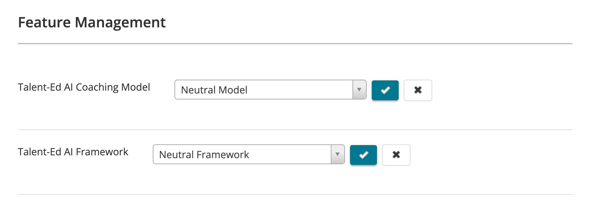
Under Talent-ed AI Coaching Model, select the coaching model that best matches your approach. You can choose from models like Practice-Based Coaching, GROW Coaching Model, or Solution-Focused Coaching.
- To get started, we recommend the 'Neutral Model' unless you have a specific coaching model and framework already provided in our list.
Next, select your preferred teaching framework under Talent-ed AI Framework. Options include frameworks like the Danielson Framework, Teaching Strategies, Positive Behavioral Interventions, and others. Your choices will help tailor AI responses based on the coaching model and framework selected, increasing alignment with your organization’s approach.
- To get started, we recommend the 'Neutral Framework' unless you have a specific coaching model and framework already provided in our list.
To learn more about how to generate an AI-generated video observation with any newer video uploads, read here .