
Video & File Collections are an easy way to organize the artifacts that you have uploaded to Talent. You can create collections in both your Videos & Files page as well as your Exemplar Library.
To get started using collections, first navigate to your 'Videos & Files.' You can create all of your own collections and add artifacts to them by clicking the 'gear icon' next to 'Collections' on the far, left-side panel.
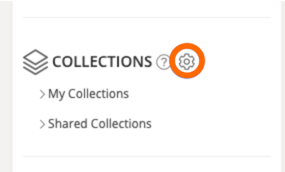
From here, you can manage your collections. Select '+ New Collection' at the bottom of the box and enter a name for your Collection. Once you've entered a name, select 'Create Collection.'

Now that this collection has been created, you can choose the artifacts that you wish to add to this collection from your Videos & Files page. Once the files are chosen, select the 'Bulk Actions' button, and add them to your Collection.

- To learn more about how to create Sub-Collections within your Videos & Files Collections, read this Help Center article here.
- To learn more about how to share Collections with other people in your system, read this Help Center article here.
Rather watch a video? Watch our tutorial on how to create Collections here. HIPAA users, click here.