
The time that videos and files take to upload to a website is highly dependent on your available Upload speed bandwidth. The FCC legally defines high-speed internet or “broadband” as an internet connection with a Download Speed of 25 Mbps or higher and an Upload Speed of 3 Mbps or higher. If your connection is below that range, it may cause issues with uploading from your device.
Video Upload Stuck
If your video upload is stalled at a certain percentage with no sign of progression, then it may have been interrupted. If that is the case, please restart your video upload.
For mobile app users, please follow this guide to restart your video upload:
Understanding Upload Speed
When recording your video using the TORSH Talent app's default resolution settings, 30 minutes of video will increase the file size by ±90MB. Use the charts below to determine the expected upload time for your video’s size.
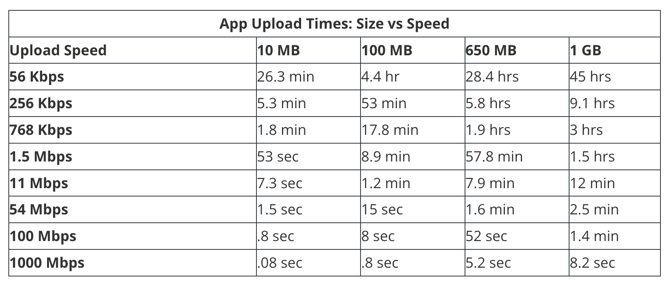
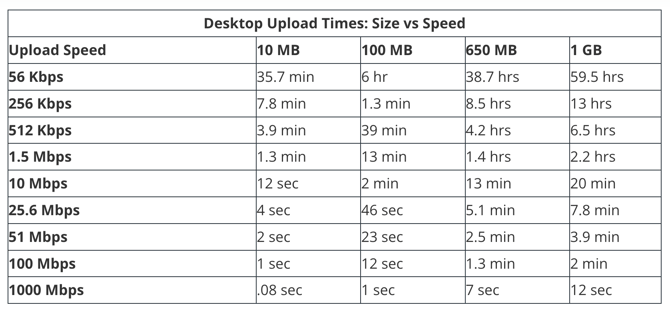
You can also use websites like speedtest.net to determine your available Upload speed.
Please note that if you record video using your device's native Camera app, you will be recording at the highest possible video quality, which will increase your file size and upload time. We highly recommend that you record video directly with the TORSH Talent mobile app, as it records at a much lower resolution by default, leading to quicker, more stable uploads to the website.