
In TORSH Talent, you can attach lesson plans, presentations, examples of student work, or even other videos to accompany and supplement your videos!
Open any video that you have uploaded and click on the 'Attachments' tab underneath the video. Once there, click on the 'Add Attachment' button.
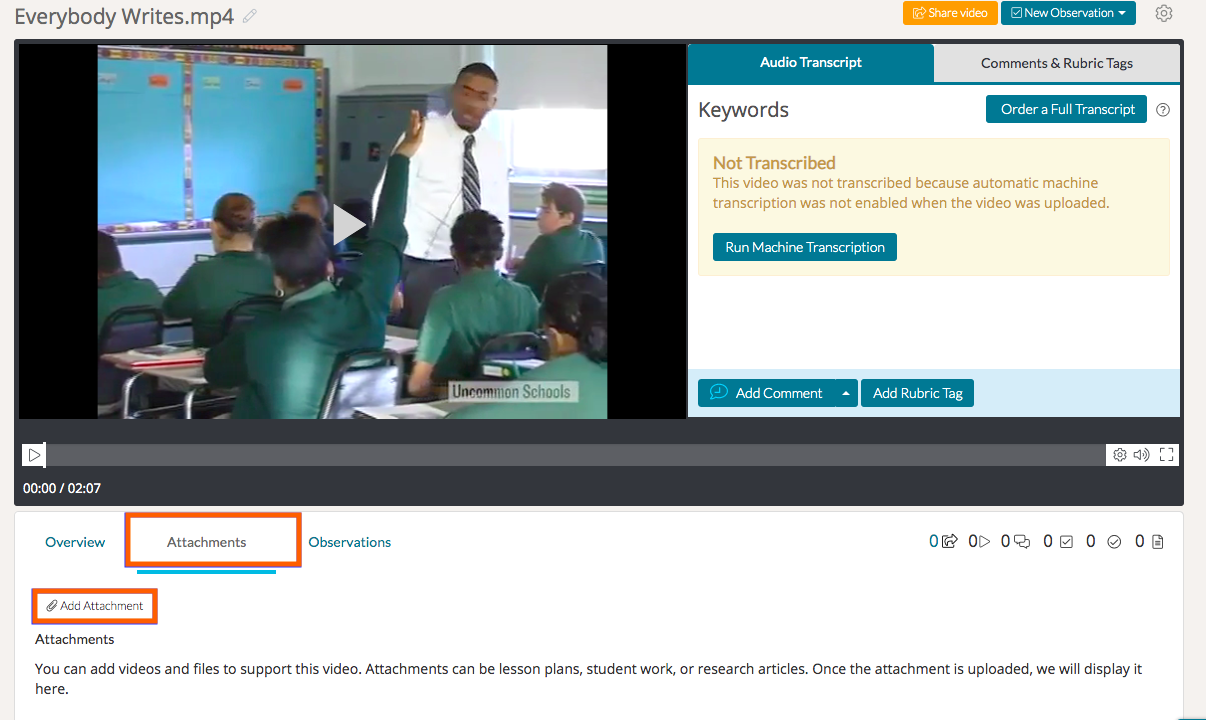
You can attach documents you have already uploaded to Talent or upload Word documents, PDFs, spreadsheets, images or presentations from your computer or a cloud-based storage system like Dropbox or GoogleDrive. Select the file you would like to upload. Once you have uploaded your file, you will find it under the 'Attachments' tab.
Talent will convert your document files into a PDF so that it is easy to read and annotate.
When you share this video with other users on the platform, they will be able to see your attachments and refer to them while they watch the video. They can also choose to download the files attached, either their original format or as a PDF so they can refer to and view the files outside of Talent.
Rather watch a video? You can learn more about how to manage your video with attachments by watching our video tutorial here. HIPAA users, click here.