
Perhaps it's been a while since you last logged in, or maybe you recently updated your account. In any case, you can easily reset your password for your TORSH Talent account when needed!
If you attempt to login to TORSH Talent with the incorrect password, you will receive a message alerting you of this error: 'Email or Password is incorrect.'
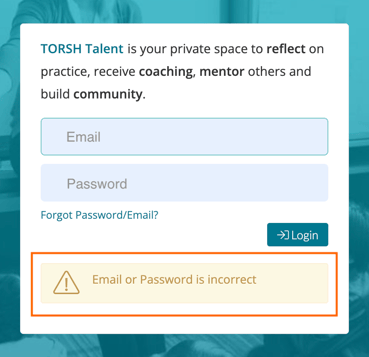
To easily resolve this issue, simply reset your password. To do so click or tap the 'Forgot Password/Email?' button on the bottom of the login screen.
You will then be directed to enter the email address associated with your TORSH Talent account. Type it in and click 'Next.'
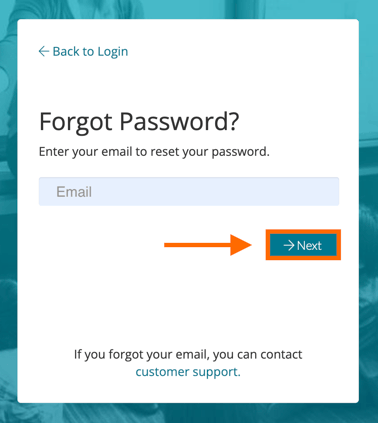
NOTE: The email address must match the email address associated with your existing account in TORSH Talent.
You will then be sent a Talent notification email containing a link to create a new password for your account. If it is not in your inbox, please double-check your Spam/Junk folder.

Follow the instructions in the notification email you receive and on the linked webpage, update your credentials with a brand new password. Once you have done so, you will automatically log into your account.
NOTE: The password used for the TORSH Talent website is the same password you will use on the TORSH Talent mobile app, so make sure to clear your cache or update your saved autofill passwords, if applicable.
If you did not receive the email in your inbox or spam folder, please contact us at support@torsh.co