
Observer role accounts have view-only access to TORSH Talent, so they are invited differently than the other roles. On the Admin Management Panel, these observers are listed with a binoculars icon next to their username. Since these users do not have full access to your TORSH Talent system, they do not count towards your user license limit.
An Observer role account is created when you share one of your Talent videos or files with someone who isn't already in your network. Sharing a file with an Observer sends an invitation to view the file, its comments, and associated documents. Observers are only able to view the shared file through their private TORSH Talent portal. Share with an observer by using the 'Share' button on any of your TORSH Talent artifacts. When the Share screen appears, click the green 'Share with Observers' tab.
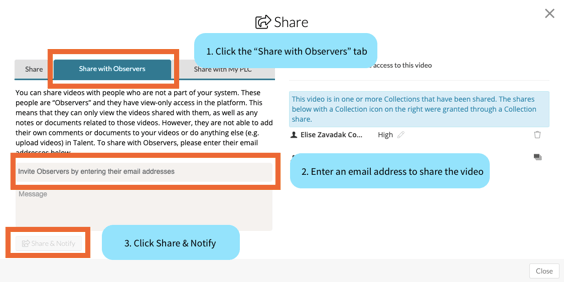
Enter the email address of the person you want to view your file. If you receive a message that they already exist in your system, click back to the 'Share' tab, and try searching the email address or name.Lastly, send the invitation by clicking the 'Share & Notify' button.