
Whenever you join a Zoom meeting on TORSH Talent with our Zoom Integration, Zoom will open up in another window and take you away from the TORSH Talent webpage.
You can view your Zoom meeting and your TORSH Talent webpage simultaneously by entering ‘Minimal View’ on Zoom.
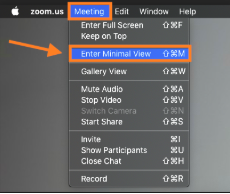
To do so, first click on your Zoom meeting window. Next, select ‘Meeting’ from the Zoom menu on top of your computer screen. Choose ‘Enter Minimal View.’
Now you can simultaneously view TORSH Talent and your Zoom meeting!
